Navexa Live: Portfolio X-Ray and Roi skills
Watch the 4 November Navexa Live replay: a Portfolio X-Ray preview, reusable Roi skills, James’s Claude example and answers about dividends, DRP and share registries.

Buying, trading and tracking cryptocurrencies? Chances are you’ll come across Blockfolio, Delta and Coinbase. Here, we explain how to use each — comparing Blockfolio vs Delta, Blockfolio vs Coinbase, & Coinbase vs Delta.
If you’re taking the plunge into the world of cryptocurrency investing or trading, you’ll need three things.
As Bitcoin and the ever-expanding universe of so-called ‘alt coins’ gains more exposure and popularity, so too does the number of technologies, platforms and applications that support the crypto ecosystem.
And if you are new to the crypto world, you may find yourself overwhelmed at the amount of apps and services vying for your time and attention.
Chances are that you will quickly come across three of the biggest platforms in the crypto world: Blockfolio, Delta and Coinbase.
While Blockfolio and Delta are similar services (with some key differences you should know), Coinbase is a very different platform.
In this post, we’ll introduce you to each, outline its capabilities and the key pros and cons.
Then, we’ll compare the services directly; Blockfolio vs Delta, Blockfolio vs Coinbase and Coinbase vs Delta.
This should give you a great general overview of these three services.
If you’re considering signing up to some or all of them, we encourage you to read this post (and do further research) first!
It’s important to understand that comparing these three platforms requires that you know their particular roles in the crypto world.
Blockfolio started out as a crypto portfolio tracker and has recently added the capability for its users to buy crypto assets within its app.
Delta is a portfolio tracker for cryptos and stocks. While you can’t buy Bitcoin in its app, there are other things you can do which make it potentially very useful.
Coinbase is different again.
As the largest cryptocurrency exchange in the United States (Binance is the world’s biggest at the time of writing), Coinbase’s main service is an app you can use to buy, store and trade Bitcoin and other crypto assets.
Confused? Don’t be.
Just understand this; in the crypto world, there are three distinct tools you need to use.
Coinbase is primarily an exchange. But it also offers a wallet for secure storage — which you can even connect to a debit card!
Blockfolio — while originally just a crypto portfolio tracker — has now branched out to offer exchange functionality.
And Delta, another portfolio tracker, doesn’t allow you to buy crypto.
But, it does allow you to connect your crypto wallet so you can automatically update your portfolio tracker account.
So not only are there many different types of platforms you’ll engage with on your crypto journey.
There’s also an increasing amount of integration as companies like these move to offer exchange, wallet and tracking services within a single platform.
Let’s get into Blockfolio in a bit more detail.
Blockfolio has been around since 2014. It started at a standalone crypto portfolio tracker.
The idea was simple: No matter where you bought or stored your crypto, you could add your trade data to your Blockfolio app and monitor your performance in one place.
And that simple idea has taken Blockfolio a long way.
Today, about 6 million people are using Blockfolio to buy, trade and track their cryptos.
Here’s what it looks like:

One of the features Blockfolio offers is Signal, which runs in parallel with the News tab.
While news delivers articles and updates from across the crypto space, Signal is a channel where crypto developers and companies communicate directly with Blockfolio users.
In our experience, Blockfolio is pretty robust (it has been known to crash occasionally and fail to display some data, particularly for smaller cryptos) and fine looking crypto portfolio tracker.
Since they were acquired by crypto exchange FTX, they’ve started offering exchange services within the app.
Delta arrived on the scene a few years after Blockfolio, in 2017.
Like Blockfolio, Delta is primarily a crypto portfolio tracker.
You can view price action for about 7,000 different crypto assets, follow the coins you’re interested in, and synchronise your account across multiple devices.
The biggest benefit of using Delta to track your crypto portfolio is the probably the fact that you can link your crypto wallet.
That means you can integrate your crypto trades seamlesslesy.
Delta supports data from about 300 crypto exchanges.
Which means whether you trade with Binance, eToro, Bittrex or any of the other myriad platforms out there, there’s a good chance you’ll be able to sync your trades.
While it’s simple enough on Delta to manually enter a trade, it becomes far easier to use once you’ve integrated an exchange and automated your buy and sell updates.
You can see the Delta interface doesn’t differ much from Blockfolio’s:

You can also set up your Delta app to send you push notifications based on what you’re tracking and how you use your account.
For a portfolio tracker, Delta packs in plenty of functionality when it comes to seeing price action, all-time and 24-hour gains.
But, like Blockfolio, it lacks a couple of major features. We’ll get to that soon.
First, let’s look at Coinbase.
Unlike Blockfolio and Delta, Coinbase didn’t start life as a portfolio tracker.
Coinbase began as a Bitcoin brokerage service in 2012.
It was a place for investors to convert fiat currency into BTC.
Today, Coinbase is the biggest U.S. crypto exchange and one of the most widely used on the planet.
It’s an exchange, a wallet, an index, a venture capital fund developing and acquiring other crypto projects, and a provider of custodian services for institutional investors moving large sums into the crypto space.
Not only that, but Coinbase has grown so powerful that it even created its own token, USD Coin.
USD Coin is a cryptocurrency that tracks the price of the US Dollar — the fiat currency which those in the crypto world (for all their talk of ‘exiting the system’) tend to use to measure the relative value of Bitcoin and the other cryptos on the market.
If you want, you can do all your crypto investing, trading and tracking with Coinbase, from buying Bitcoin to trading it for other cryptos (even holding in USDC if you want) and tracking the value of your investments.
But since Coinbase is an exchange first and foremost, it offers a very different experience from Blockfolio and Delta.
As you can see, Blockfolio and Delta look very similar.
And as portfolio trackers, they pretty much are.
But if we’re comparing Blockfolio vs Delta, these are the most striking differences.
Those are the main differences between Blockfolio and Delta.
For more about each platform, check out this Blockfolio review and this Delta review.
So, now that you have an idea about how Blockfolio works, let’s compare it with Coinbase.
Blockfolio vs Coinbase isn’t a like-for-like comparison.
As mentioned above, Blockfolio started life as a portfolio tracker, and Coinbase as a Bitcoin brokerage.
Today, they’re getting closer to meeting in the middle.
Since FTX acquired it, Blockfolio now complements its coin and portfolio tracking functionality with trading services.
In other words, you can buy Bitcoin directly through the app.
For Coinbase, buying Bitcoin was the first service the platform ever provided.
Today, it offers a huge range of tools when you sign up.
One of the ways Coinbase has expanded is that it, too, offers a portfolio tracking service as well as its exchange and wallet service.
Take a look:
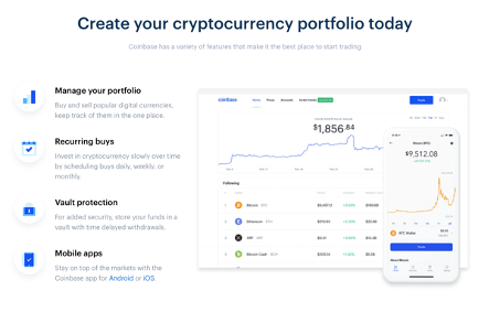
Like Blockfolio and Delta, Coinbase lets you track coins and trades in a simple, clean interface.
But in our opinion, the Coinbase portfolio tracker doesn’t offer as much information as Blockfolio.
Comparing Blockfolio vs Coinbase, these are the main differences.
Since we’ve already covered the key differences between Blockfolio vs Coinbase and Blockfolio vs Delta, you can probably see how Coinbase stacks up against Delta.
These are the big differences.
Comparing Blockfolio vs Delta vs Coinbase highlights a few things you should understand before you sign up to any, or all of these services.
First, trading, storing and tracking cryptos has tended to happen across multiple different services. These services often integrate with one another to some extent, and they increasingly offer users a full service platform (see Coinbase) from buying crypto all the way through to tracking its performance in your portfolio.
One thing we’ve noticed comparing these crypto platforms is that, while they all offer portfolio tracking, that functionality is in reality quite limited.
Here at Navexa, we take portfolio tracking — for stocks and cryptos — seriously.
We help you dive deeper into your portfolio performance beyond just daily or annual gains.

Navexa tracks the annualized, true performance of your portfolio and its constituent holdings with a high degree of clarity, depth and detail.
By ‘true’ performance, we mean your net gains (in dollar and percent terms) after the platform accounts for the time in the market, trading fees, currency gains or losses, taxation, and dividend income.
If you’re not familiar with the idea of true portfolio performance, check out this guide on the three mistakes you might be making when calculating your own.
In other words, a complete picture of your actual portfolio performance, as opposed to a partial one.
Plus, you can generate a variety of reports, from calculating unrealized capital gains to taxable income, portfolio contributions, and many more.
If you’re serious about understanding your portfolio performance, we recommend a more powerful, dedicated portfolio tracker.
Track your portfolio in Navexa
Free 14-day trial. No credit card required.
Try Navexa Free →Watch the 4 November Navexa Live replay: a Portfolio X-Ray preview, reusable Roi skills, James’s Claude example and answers about dividends, DRP and share registries.
Join Tom and James for weekly Navexa demos and Q&A. The next session is on 11 November at 2 pm AEDT. Register, submit a question and receive the recording.
Watch the first Navexa Live with Tom and James: Roi, Scenarios, gold tracking through MCP, cash accounts and answers to your portfolio questions.