Introducing Navexa Live with Tom & James
Join Tom and James for weekly Navexa demos and Q&A. Our first 40-minute session is on 28 October at 1 pm AEDT. Register, submit a question and receive the recording.
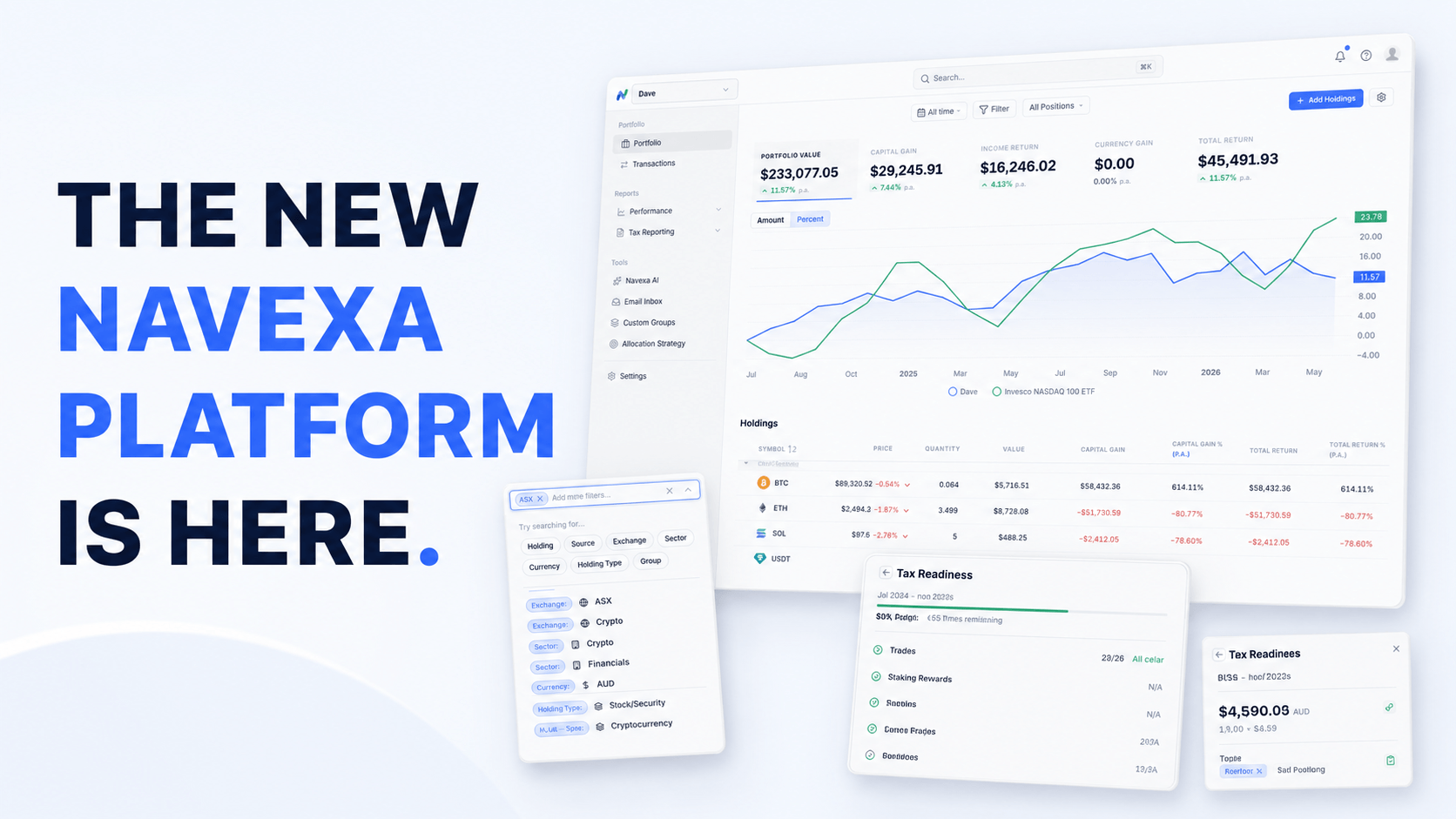
On 15 April 2026, we launched the next major evolution of Navexa.
This is not just a visual refresh. It is a comprehensive rebuild of the Navexa platform, designed to make tracking your portfolio faster, clearer, and easier to manage.
The new platform brings together a cleaner interface, faster navigation, more powerful filtering, a brand-new transactions workflow, improved tax-readiness tools, and a stronger foundation for the next generation of Navexa features.
In short: Navexa has been redefined.
We revealed the new platform live in our launch webinar, where we walked through the redesigned portfolio experience, the new Transactions page, tax-readiness improvements, the upcoming mobile app, and some of the ways we are using AI to improve the Navexa experience.
Watch the replay here:
Got a few minutes? Watch the walkthrough to see the new platform in action and explore the biggest changes.
Navexa started as a portfolio tracking tool for investors who wanted a better way to understand their performance.
Since then, it has grown into a more advanced platform for investors who need accurate portfolio tracking, performance reporting, tax reporting, and investment data across multiple markets and asset types.
Today, Navexa tracks billions of dollars of investments across thousands of portfolios. Our users include long-term investors, high-net-worth individuals, family offices, SMSF investors, accountants, and professionals who need reliable tracking and reporting.
As our users’ portfolios have become more sophisticated, the platform has had to evolve too.
You asked us to make Navexa more powerful without making it harder to use. We listened.
The new platform has been designed to preserve the depth and accuracy Navexa is known for, while making the day-to-day experience cleaner, faster, and more intuitive.
The Portfolio page remains at the centre of Navexa.
It is still the place to check your portfolio performance, review your holdings, compare returns, and understand what is happening across your investments. But the experience has been rebuilt and refined so the information you need is easier to find and easier to read.
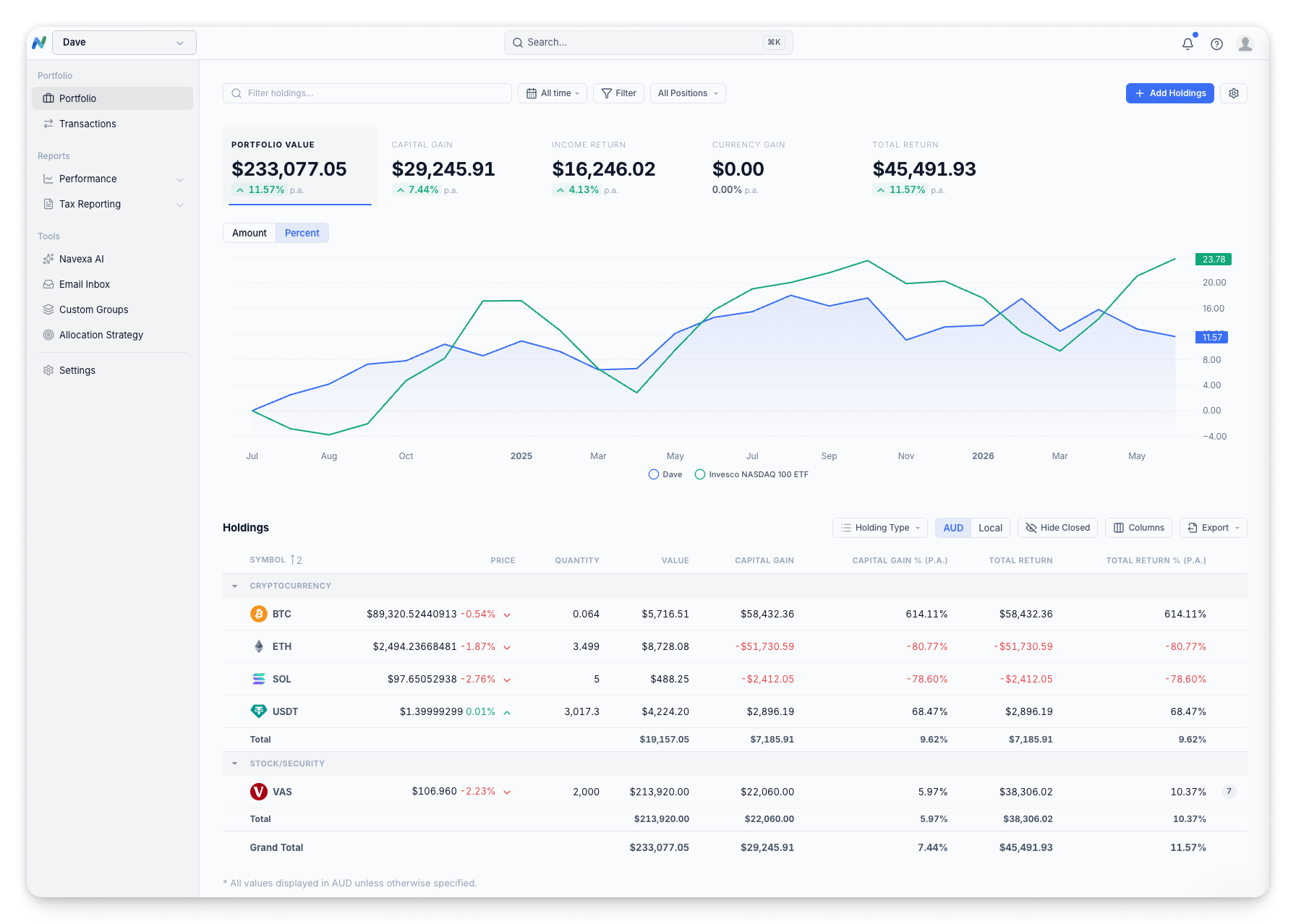
The new Portfolio page includes cleaner performance cards, improved charts, clearer tables, better spacing, updated fonts, and larger holding icons.
You can still view key metrics like portfolio value, capital gain, income return, currency gain, and total return. Those metrics now sit in clearer cards, making it easier to see which performance view you are looking at and move between them.
We have also improved the way you work with date ranges, currencies, groups, columns, and portfolio views.
The result is a platform that should feel familiar to existing Navexa users, but much smoother to use.
One of the biggest improvements in the new platform is the filtering experience.
Navexa has long allowed users to filter their portfolio data, but in the old platform, the feature could be easy to miss or a little clunky to use. In the new version, filtering is faster, more visual, and much easier to apply.
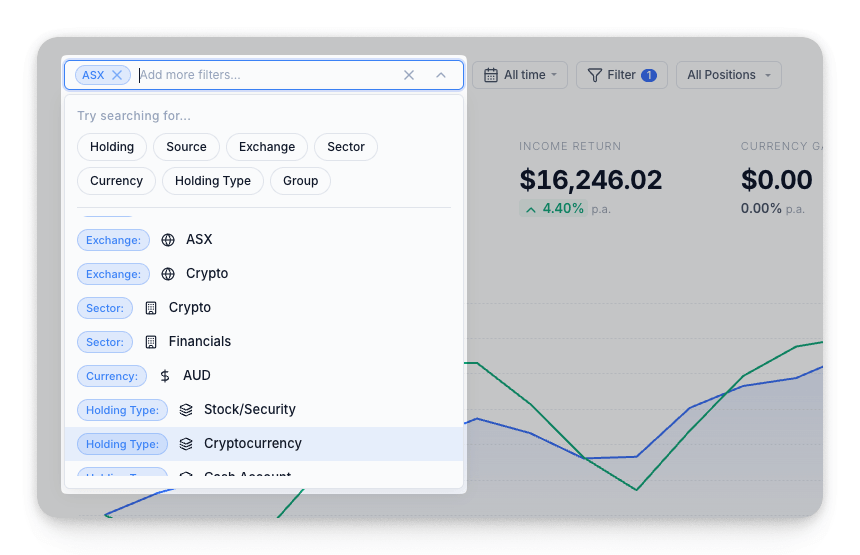
You can now search and apply filters directly from the Portfolio page. Filter by holding, group, sector, broker, asset type, exchange, and more.
You can also stack filters together to build a more specific view of your portfolio.
For example, you might want to view:
As you apply filters, the page updates to show the relevant data.
This makes it much easier to drill into your portfolio and answer specific questions without jumping between different reports or screens.
The biggest new workflow in the platform is the new Transactions page.
Previously, your investment activity was split across different areas, like trades, dividends, and holding-level records. Now, the Transactions page brings everything together in one unified workspace.
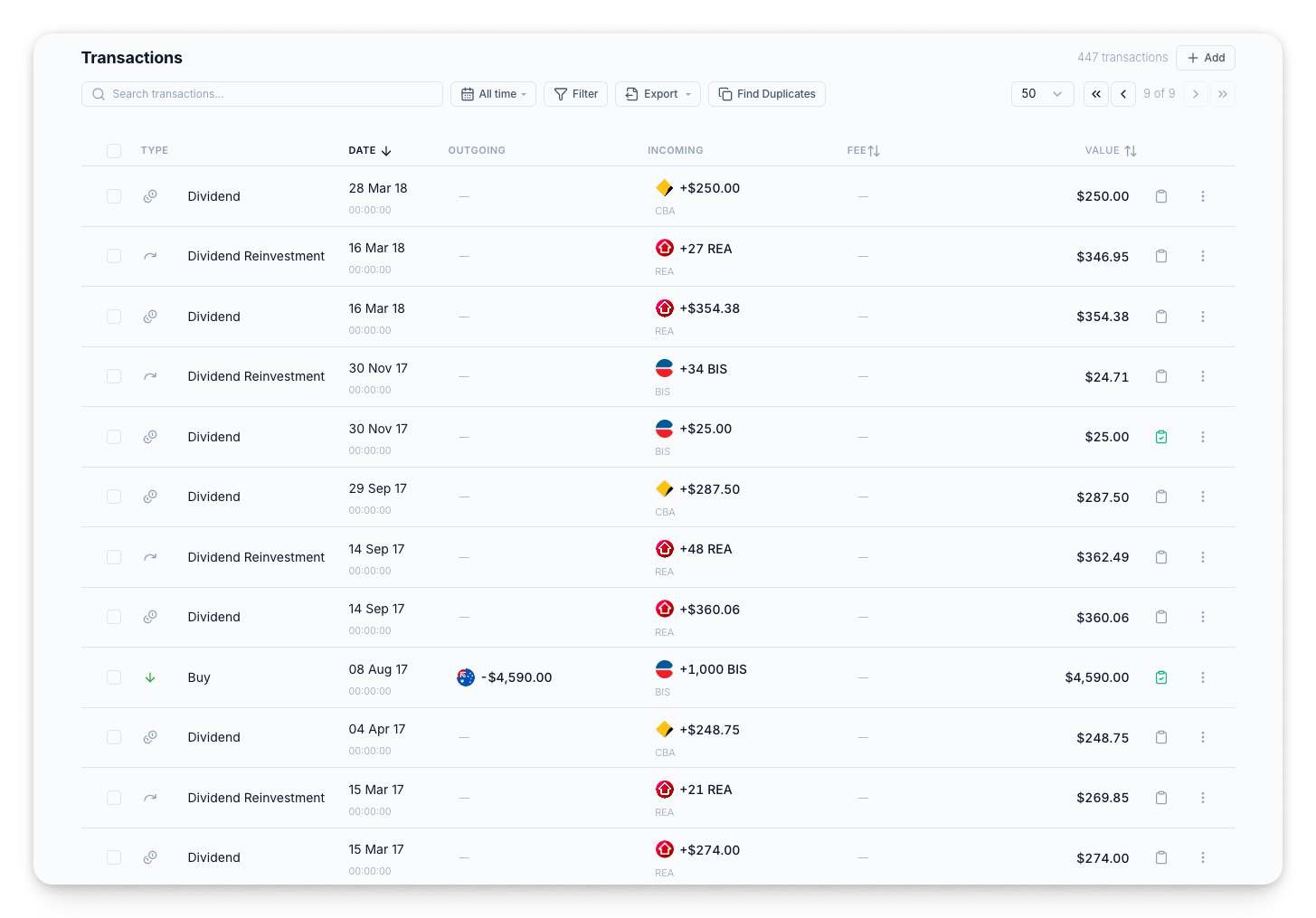
This gives you one place to view, manage, edit, confirm, unconfirm, review, and export the records behind your portfolio.
That includes:
Think of it as the backbone of your portfolio.
Instead of moving between different screens to find and fix records, you can now manage your investment activity from one place.
We know how frustrating it can be to lose your place just to fix a single record.
With the new inline editing workflow, you can click on a transaction and edit the details directly in a side panel. Once you are done, you are right back where you started.
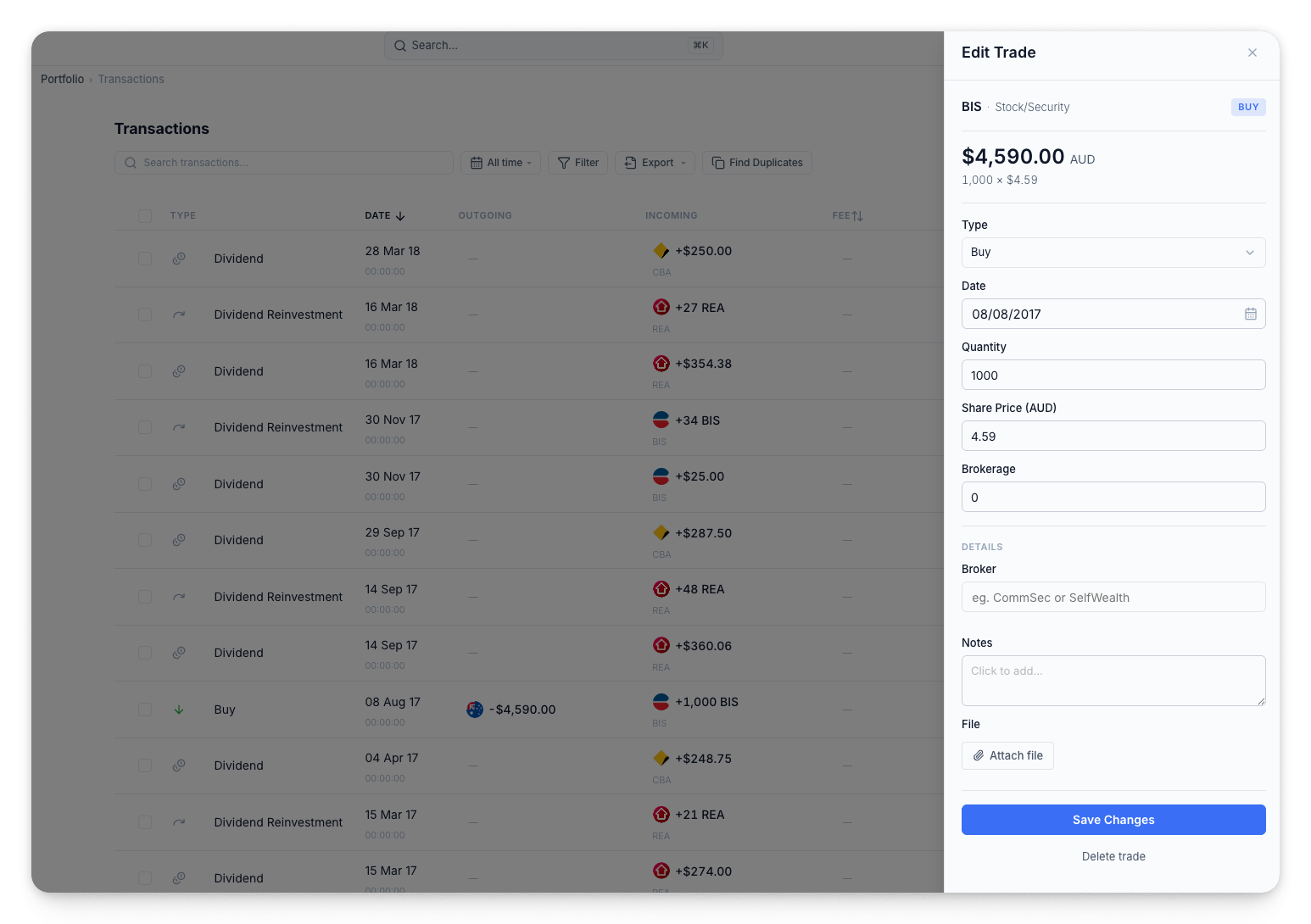
This makes it much faster to clean up data, reconcile records, fix incorrect values, and review your investment activity.
You can also add new transactions directly from the Transactions page. So if you notice something missing, you can create it without having to leave the workflow you are in.
The new platform also includes transaction history.
This gives you a clearer audit trail of changes made to a record. You can see whether a record was generated by Navexa, edited manually, or changed later.
This is especially useful for users who share access with an accountant, partner, adviser, or other team members.
Instead of guessing what changed, you can review the history and understand what happened.
Duplicate transactions can be difficult to find, especially if you have years of portfolio data.
The new platform includes a duplicate review workflow designed to make this easier. Navexa can flag suspected duplicates and recommend which records to keep or delete.
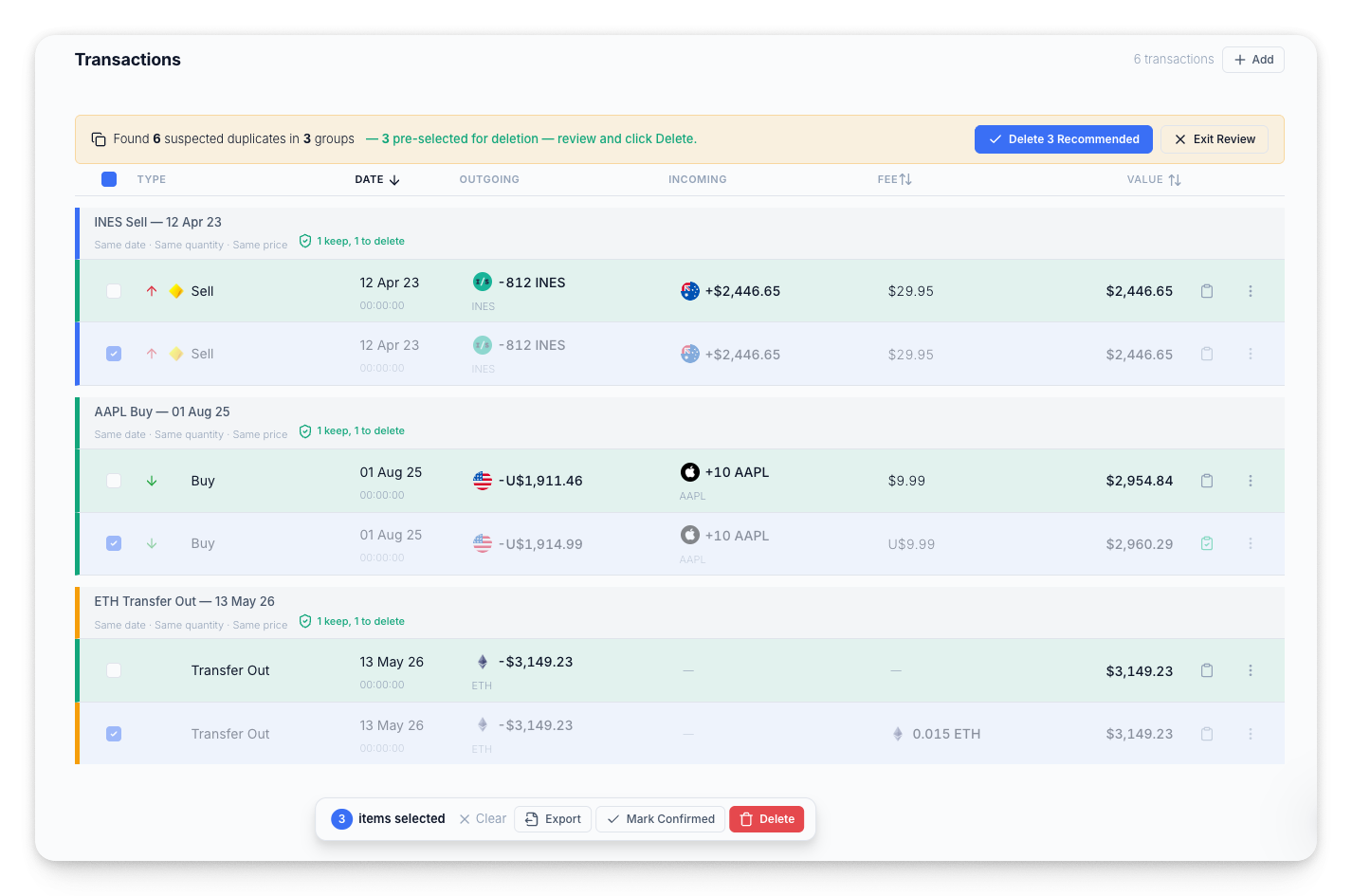
You stay in control. You can review the suggested duplicates, confirm the recommendations, or leave records unchanged if they are genuine separate transactions.
This gives you a faster way to clean up your portfolio data while still maintaining control over what gets changed.
Your data is valuable.
Navexa is designed to help you track, calculate, and report on it, but we also want to make it easier for you to access your data when you need it.
The new Transactions page makes it easier to export your portfolio records. You can select individual transactions, filter down to a specific set of records, or export your transaction data for your own backup and analysis.
It is one of those features you may not need every day, but when you do need it, it matters.
The new platform also improves the tax-readiness experience.
Navexa already helps investors identify issues that may affect their tax reporting, including trades with errors, unconfirmed dividends, staking rewards, and AMIT/AMMA trust income data.
The new Tax Readiness page brings these issues into a clearer checklist-style workflow.
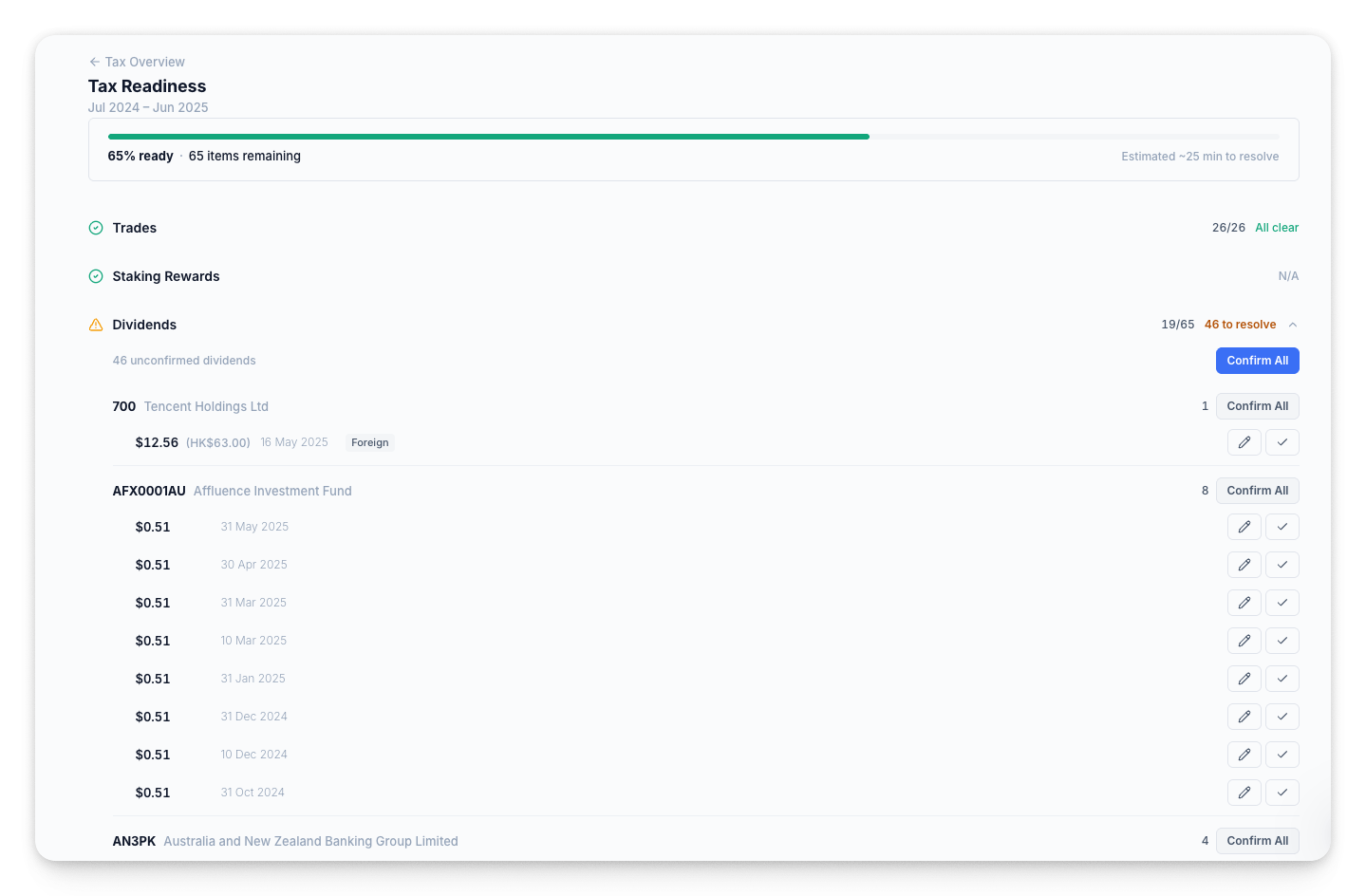
You can see your readiness score, review what needs attention, and work through issues from one place.
This includes areas like:
The aim is to make tax preparation less reactive and less stressful.
Instead of waiting until tax time to discover issues, Navexa helps surface them earlier so you can resolve them with more confidence.
Navigate at lightning speed.
By hitting Command + K on Mac or Control + K on Windows, you can instantly open the new unified search bar.
From there, you can quickly jump to pages, reports, holdings, and actions.
For example, you can search for:
We designed this for power users who want to fly through the platform without ever touching a menu.
It is a small feature, but one that makes Navexa feel much faster once you start using it.
The new platform is also part of a broader change in how we support customers.
Our goal is to make Navexa easier to use, easier to troubleshoot, and easier to get value from. That means improving the product itself so users can self-serve more often, while also improving the support experience when help is needed.
We have been expanding and updating our help centre, improving support workflows, and using AI internally to help investigate complex issues faster.
The aim is not to replace human support. It is to make support faster, more accurate, and more proactive.
Over time, we want to move from a reactive support model to a more proactive one, where Navexa can help identify potential issues earlier and guide users toward resolving them.
This launch is not the finish line.
It is the new foundation.
With the redesigned platform now in place, we can move faster on the features and improvements our customers have been asking for.
During the webinar, we also previewed the redesigned mobile app experience, which is being rebuilt to better match the new web platform.
The new mobile experience is designed to make portfolio tracking clearer on the go, with better charts, cleaner holding views, allocation insights, top performers, and improved access to the kinds of reports users rely on in the web platform.
We also discussed future areas of development, including more powerful tax tools, improved data access, AI-assisted workflows, and additional asset support.
The new Navexa platform is designed to give investors more clarity, more control, and more confidence.
It is cleaner to use, faster to navigate, and more powerful where it matters.
You can now filter your portfolio more easily, manage every transaction from one place, review duplicate records, track what needs fixing before tax time, and jump anywhere in seconds.
This is a major step forward for Navexa.
And it is just the beginning.
Ready to see the difference for yourself?
Existing users can log in now to explore the new experience.
General information only. Navexa does not provide personal financial or tax advice. You should consider your own circumstances and seek professional advice where appropriate.
Track your portfolio in Navexa
Free 14-day trial. No credit card required.
Try Navexa Free →Join Tom and James for weekly Navexa demos and Q&A. Our first 40-minute session is on 28 October at 1 pm AEDT. Register, submit a question and receive the recording.
Watch my Marcus Today webinar on investment tax records, AMMA statements, cost base adjustments and parcel selection, with slides and audience questions.
Tom Wilson shares the story behind Navexa’s Roi reveal with Owen Rask. Watch the workshop replay, explore Scenarios and catch the audience’s questions.